

Consider the last marketing campaign. How many hours did your team waste on searching for stock images, briefing freelance illustrators, revision time, and undersizing of assets to fit them to the various platforms?
According to the 2025 HubSpot report, visual content is three to five times less likely to be created than written content, yet demand has increased by more than 400% over the past three years.
This is particularly perceived among individuals and teams. Original illustrations are costly, stock images are usually generic, conventional AI image generators do not work consistently, and image quality, especially in terms of noise and sharpness, requires extensive manual editing.
That’s where Leonardo AI steps in.
Leonardo, instead, was not another text-to-image application but rather designed as an entire creative suite. It is powered by AI image generation combined with real-time editing on a computer monitor, video animation, 3D texture creation, and model training using personal computer data, all on a single web-based platform.
You need to paint game-ready concept art, sell products as a marketing creative, create product mockups, or create snackable visuals for social media. Leonardo takes you through the whole process, from idea to finished product.
Value proposition can hardly be neglected. As a rule, freelance illustrators charge an average of $50 to $ 200 per image. Compared with the Artisan plan (costing $24/month), users can create hundreds of images each month, which, in turn, is estimated to result in an 80–95% cost reduction for teams that create 30 or more images in a custom form.
So, is Leonardo AI actually worth it?
This review answers that question with real data. We break down Leonardo’s features, pricing, strengths, limitations, and competitors—along with our structured Vendor Accountability Index—to give you a complete, unbiased evaluation.
What Is Leonardo AI — And Why It Is Different
Leonardo AI is a web-based generative AI system that generates content from simple text prompts, images, textures, video, and design objects. The platform was initially focused on creating game assets, but in recent years, it has become relatively multifaceted, with over 30 million users.
Leonardo was launched in 2022 and quickly became popular among creators, marketers, and designers for its ability to produce high-quality, customizable visuals in large quantities. It was purchased by Canva in July 2024, making its influence in the creative tools sphere even greater.
The difference between Leonardo and other vendors is that it emphasises generation-first workflows. Although similar to other platforms in its focus on editing or layout design, Leonardo is designed to create original visual content directly, enabling the user to have greater creativity and flexibility.
When comparing Leonardo AI and Canva AI, the distinction comes down to this: Leonardo is software designed to create things, while Canva is designed to assemble and edit designs. Simply put, Leonardo is the origin of ideas, and Canva is the place of ideas’ sophistication and display.
How Leonardo AI Works — Step by Step
Using Leonardo AI is straightforward and flexible, even for beginners.
It is initiated by a text prompt describing what you desire to create. Then you simply select a model (e.g., Phoenix or Lucid Realism), set the settings (guidance scale and resolution), and create your picture.
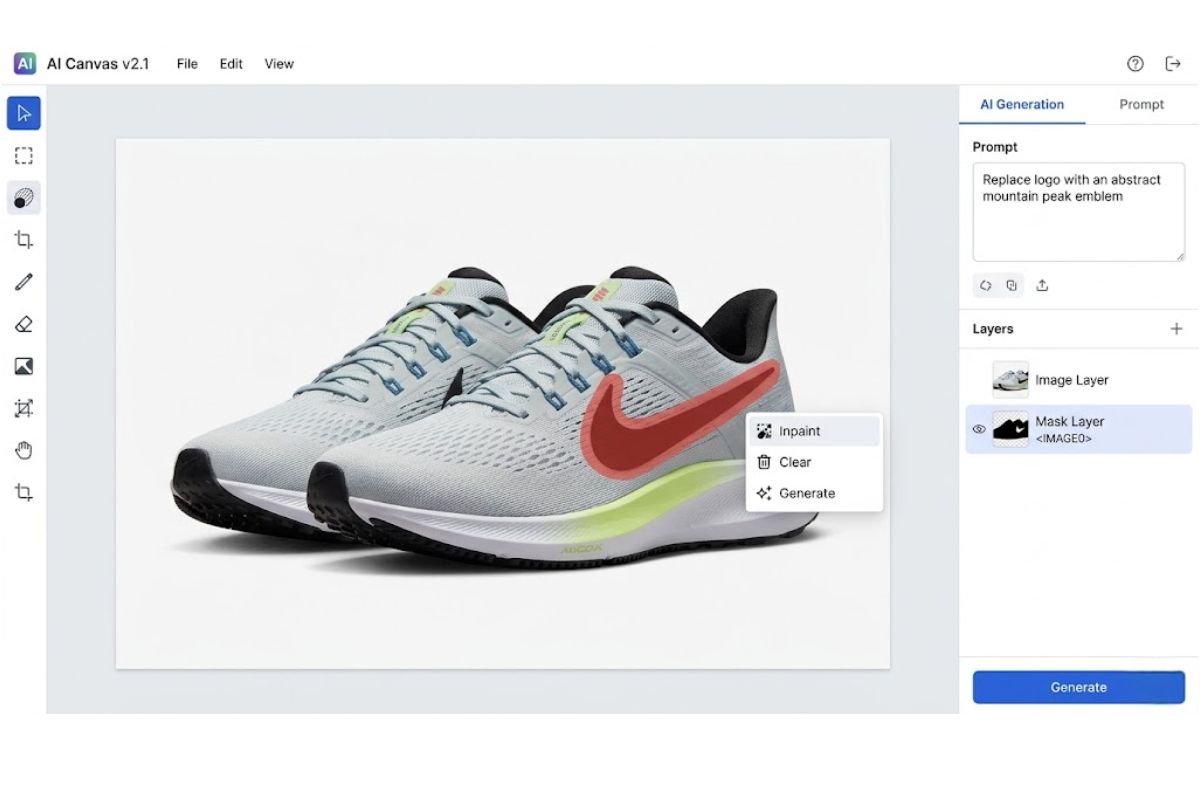
The platform generates hundreds of options in a few seconds, depending on what you are looking at. There, you will be able to narrow down the results using the tools. Inpainting lets you edit certain aspects of the image (using the AI Canvas), or outpainting lets you continue the image beyond its boundaries.
Motion upsampling can also be used to convert still content into animation, and game engines (Unity and Unreal Engine) can be used to generate high-resolution 3D textures.
What sets Leonardo apart:
It provides a full creative workflow within a single place.
This contrasts with Midjourney, which utilises Discord and leaves only light modification after creation, whereas Leninovan does not require any third-party software. Unlike DALL-E 3, which places great emphasis on the accuracy of the promotion in the prompt itself and does not give the system the opportunity to edit the generated and promoted content, Leonardo gives the user more opportunities to refine and enhance the product.
Put simply, Leonardo is a complete creative studio. The ability of the creative industry to create, edit, refine, scale, animate, and even train custom models without changing platforms.
Our Hands-On Testing — How We Evaluated Leonardo AI
The Techi9 editorial team generated over 150 images across all major models—including Phoenix, Lucid Realism, Anime, Cinematic, and Concept Art—during a two-week evaluation period.
We tested a wide range of use cases to ensure balanced results:
- Simple prompts: product shots, headshots
- Complex prompts: multi-subject scenes, controlled lighting setups
- Edge cases: architectural renders, mechanical objects, and text within images
This approach helped us evaluate both creative flexibility and technical consistency across different scenarios.
Quality and Speed Observations
Phoenix’s performance was the most stable, with about 85% of outputs usable without significant modifications.
In all models, visible artefacts were found in about 8-10% of the generated images, which was very much in line with prevailing industry standards.
In terms of speed:
- Average generation time: 1024×1024 images average generation time 8-15 seconds.
- Peak-hour delays: 20 30 seconds on non-priority generations.
Overall, Leonardo performed faster than Midjourney at similar output quality, especially under standard usage conditions.
Leonardo AI Alchemy — On vs Off
To test the impact of Alchemy, we ran 20 identical prompts with the feature both enabled and disabled.
With Alchemy turned on:
- Lighting consistency improved noticeably
- Fine details (such as hair and fabric textures) appeared sharper
- Colour grading looked more cinematic and refined
However, each generation consumed approximately 2.5× more tokens, making it significantly more resource-intensive.
Recommendation:
Use standard generation for drafts and early iterations. Enable Alchemy selectively when producing final, high-quality assets where visual precision matters most.
What Fell Short in Testing
Despite its strengths, Leonardo AI showed a few consistent limitations during testing.
Text rendering within images remained unreliable, with clearly legible text appearing in only about 60% of attempts.
Inorganic subjects—such as cars and machinery—often require three to five retries to achieve realistic proportions and accurate detailing.
The most significant drawback was seen in video generation. A single Veo 3 video clip consumed the equivalent of 300 standard image generations, which could quickly exhaust the entire allocation of an Apprentice plan in just one use.
Leonardo AI Key Features
1. AI Image Generation with Multiple Specialised Models
Leonardo offers an assortment of fine-tuned models rather than a single generalised engine. Phoenix offers the best, timely fidelity in professional outputs. Lucid Realism is talented in product photography and photorealistic portraits.
An organised model machine is also offered by Leonardo, which enables artists to select the appropriate engine for each task:
- Phoenix: Best for high prompt accuracy and consistent professional outputs
- Lucid Realism: Perfect in product image and realistic depiction of portraits
- Other styles: Anime, cinematic, concept art and graphic design
👉 Added insight: Instead of repeatedly tweaking prompts, switching models often delivers faster and more accurate results.
2. AI Canvas — Pixel-Level Editing Control
The AI Canvas makes Leonardo a generator: an inpainting, outpainting and sketch-to-image conversion creative studio. Rough Designing affected Design Designers sketch quickly on the Realtime Canvas as the AI creates and perfects the rough designs concurrently, transforming ideation ideally greatly.
To simplify usage, it also supports:
- Inpainting (editing specific areas)
- Outpainting (expanding beyond edges)
- Real-time sketch-to-image generation
👉 Added value: Many users fix small issues (like hands or product flaws) directly in Canvas instead of regenerating entire images, saving both time and tokens.
3. AI Video Generation and Motion Tools
Leonardo’s Motion tool animates still images into short video clips with realistic camera movements and parallax effects. The platform also integrates Veo 3, Sora 2, and Kling for text-to-video generation—viable for social content, product demos, and storytelling without leaving the platform.
It also enables:
- Social media content creation
- Product demos
- Storytelling visuals
👉 Added insight: Video generation is powerful but token-heavy, so it’s best used for high-impact content rather than daily production.
4. 3D Texture Generation for Game Development
One of the best functions of Leonardo AI for developing a game: the platform can create UV-mapped textures, albedo, normal, and roughness maps from text prompts. The tileable textures are based on Unity and have direct support with the Unreal Engine, making asset pipelines easier than before, when they had to be handled manually by texture artists.
These include:
- Albedo maps
- Normal maps
- Roughness maps
The textures are tileable and integrate smoothly with Unity and Unreal Engine, significantly reducing manual workload in asset pipelines.
👉 Added value: Especially useful for indie developers who want to prototype environments quickly without large art teams.
5. Custom Model Training
Paid subscribers can train custom AI models on their own image datasets, enabling stylistic consistency across large projects. This is a genuine differentiator for brand teams that need outputs matching a specific visual identity.
This enables:
- Consistent visual style across projects
- Brand-specific outputs
- Scalable creative production
A major advantage is that teams need a uniform design identity.
👉 Added insight: Ideal for agencies handling multiple campaigns where visual consistency is critical.
6. Universal Upscaler and Background Removal
The Universal Upscaler can also enlarge any image by a factor of two or four, increasing coherent detail rather than merely stretching pixels. Background elimination works well with simple subjects in an image, providing a one-click clean-up. One-Click Background Remover is reliable for simple subjects, such as e-commerce product photography and marketing assets.
Alongside this, it is especially useful for:
- E-commerce product images
- Marketing creatives
👉 Added value: Frequently used to upgrade low-quality supplier images into high-resolution listing visuals.
7. Transparent PNG Maker
Get a background-free image with no corresponding post-processing – helpful in logo ideas, stickers, user interface, and overprint images.
Leonardo can create images without a background and does not need any additional editing.
Useful for:
- Logo concepts
- Stickers
- UI elements
- Layered compositions
8. Creative Engine API
Launched in 2026, the Creative Engine API lets developers integrate Leonardo’s generation into custom applications. API plans start at $9/month for 3,500 credits with 5 concurrent requests—enabling programmatic image generation for e-commerce catalogues, dynamic ad creatives, and automated content pipelines.
It includes:
- Starts at $9/month for 3,500 credits
- Supports up to 5 concurrent requests
Ideal for:
- E-commerce catalogue generation
- Dynamic ad creatives
- Automated content pipelines
👉 Added insight: Businesses are increasingly using APIs like this to automate large-scale visual content production.
9. Leonardo AI Alchemy Enhancement Pipeline
What is Leonardo AI Alchemy? An advanced processing pipeline that enhances lighting, contrast, detail coherence, and fidelity. In our testing, the quality uplift was immediately visible and justified the 2–3× additional token cost for client-facing deliverables.
Leonardo AI Alchemy improves:
- Lighting
- Contrast
- Detail consistency
- Overall image quality
The testing showed the improvement was evident. It is, however, 2–3× more token-consuming, so it is most useful for the final and quality output than for early drafts.
👉 Best practice: A Final output should only be used, not on drafts, to save on cost and quality.
10. Token Rollover and Relaxed Generation
Artisan and Maestro subscribers benefit from Token Rollover, banking unused tokens into a reserve of up to 180,000. When fast tokens are exhausted, Relaxed Generation allows continued creation at lower queue priority with no additional cost—preventing hard cutoffs.
These include:
- Token Rollover: Save unused tokens (up to 180,000)
- Relaxed Generation: Continue creating with a slower speed after limits
This prevents workflow interruptions and avoids the hard limits seen on many competing platforms.
👉 Added value: Ensures uninterrupted workflows, especially during heavy usage periods.
Use Cases — Where Leonardo AI Delivers Real ROI
| User Type | Primary Use Cases | ROI / Time Saved |
| Content Creators | Images on blogs, social media images, thumbnails, newsletter images | Replace $50-200/image freelance costs; generate 100+ images/month for $24 |
| Digital Marketers | Ad creatives, landing page visuals, A/B test variants, product mockups | Cut design iteration from 3 days to 30 minutes; 90% cost reduction vs agencies |
| Game Developers | Concept art, character designs, 3D textures, environment assets | 3D texture generation eliminates a dedicated texture artist; accelerates pre-production 5x |
| E-Commerce Teams | Product photography, lifestyle shots, catalogue images, transparent PNGs | Reduce product photo costs from $25/shot to under $1/shot at scale |
| YouTubers & Creators | Thumbnails, channel artwork, stills of videos, storyboards | Photoshop professional thumbnails take 45 minutes vs. 30 seconds |
| Architects & Designers | Interior renders, material explorations, client presentations | Same-day visual explorations vs week-long render cycles |
Leonardo AI Pricing — Plans Compared (2026)
Leonardo AI uses a token-based subscription model. Every action—image generation, video creation, upscaling, and premium model usage—consumes tokens from your monthly or daily allocation.
Premium features like Leonardo AI Alchemy can consume 2× to 4× more tokens than standard image generation, making usage strategy important for cost control.
| Plan | Monthly Price | Tokens/Month | Relaxed Gen | Private Mode | Best For |
| Free | $0 | 150/day | No | No | Testing and experimentation |
| Apprentice | $12/mo | 8,500 | No | Yes | Hobbyists and casual creators |
| Artisan | $24/mo | 25,000 | Yes (Unlimited) | Yes | Professional creators and marketers |
| Maestro | $48/mo | 60,000 | Yes (Unlimited) | Yes | Agencies and power users |
| API Basic | $9/mo | 3,500 credits | N/A | N/A | Developers and custom integrations |
Annual billing saves ~20%. Token Rollover on Artisan/Maestro banks 25,500 to 180,000 tokens. Top-up packs never expire.
Leonardo AI Token Calculator — Real Cost Per Action
One of the most common complaints across Leonardo AI reviews is that headline token numbers can be misleading. While plans advertise large token allocations, the actual cost per action varies significantly based on how you use the platform.
Here’s a realistic breakdown based on hands-on testing and typical usage patterns:
| Action | Tokens Used | With Alchemy | Apprentice Plan Yields (8,500 tokens) |
| Standard image (1024×1024) | 5-8 | 12-20 | 1,000-1,700 images / 425-700 with Alchemy |
| Phoenix model image | 8-12 | 20-30 | 700-1,060 images / 280-425 with Alchemy |
| 2x Universal Upscale | 10-15 | N/A | 560-850 upscales |
| 4x Universal Upscale | 20-25 | N/A | 340-425 upscales |
| Motion (image-to-video) | 25-40 | N/A | 210-340 clips |
| Veo 3 videos (8 seconds) | 300+ | N/A | ~28 clips (exhausts full monthly allowance) |
Key takeaway: Standard image generation without Alchemy delivers excellent value—even on the Apprentice plan.
However, once you start using advanced features like Alchemy, video generation, or custom model training, token consumption increases rapidly. In these cases, upgrading to higher tiers, such as the Artisan plan (25,000 tokens) or the Maestro plan (60,000 tokens), becomes necessary for consistent usage.
Another important advantage of these plans is the relaxed generation. Even after your fast tokens are exhausted, you can continue generating content at a slower speed using a lower-priority queue.
👉 Practical insight: This means you don’t hit a hard stop—you trade speed for continuity, which is especially useful during heavy workloads or tight deadlines.
Leonardo AI — Pros and Cons
| Pros | Cons |
| ✓ Generous free tier with 150 daily tokens for sustainable experimentation | ✗ The token system is confusing; premium features consume 2-4x more tokens than standard |
| ✓ Complete creative suite: generate, edit, animate, upscale and train models in one platform | ✗ Free-tier images include watermarks, making them unusable for professional work |
| ✓ Multiple specialised models (Phoenix, Lucid Realism, Anime, Cinematic) for targeted outputs | ✗ Complex prompts do not always generate expected results, requiring multiple iterations |
| ✓ AI Canvas with inpainting, outpainting and real-time sketch-to-image conversion | ✗ Inorganic objects (cars, machinery, architecture) often require several retries for realism |
| ✓ Web-based interface — no Discord dependency, no local installation required | ✗ Shared cloud infrastructure means slower generation during peak usage hours |
| ✓ Full commercial rights on all paid plans; IP ownership retained by creators | ✗ Refund policy is restrictive; cancellation forfeits unused tokens immediately |
| ✓ 3D texture generation is a unique competitive advantage for game developers | ✗ Video generation is extremely token-hungry; a single 8-second Veo 3 clip costs 300+ tokens |
| ✓ Canva acquisition ensures long-term platform viability and continued investment | ✗ Steeper learning curve than simpler alternatives due to the extensive feature set |
Leonardo AI vs Competitors — Feature Comparison
When evaluating alternatives to Leonardo AI, context matters. Here is how Leonardo stacks up against the four most-searched competitors in 2026. For a deeper look at individual tools, see our dedicated reviews linked below.
| Feature | Leonardo AI | Midjourney | DALL-E 3 | Adobe Firefly | Stable Diffusion |
| Starting Price | $0 (Free tier) | $10/mo | Free via ChatGPT | $0 (Free tier) | Free (open-source) |
| Interface | Web app + API | Discord-based | ChatGPT / API | Web + Photoshop | Local / Web UIs |
| Image Quality | Excellent (Phoenix) | Best-in-class | Very Good | Very Good | Variable by model |
| Canvas Editing | Yes (Advanced) | No | No | Yes (Photoshop) | Via third-party |
| Video + 3D | Yes (Motion, Veo 3, 3D textures) | Limited video | No | Basic video | Via plugins |
| Custom Models | Yes | No | No | No | Yes (full control) |
| Best For | Control + volume | Artistic quality | Simplicity | Brand safety | Full customisation |
Who Should NOT Use Leonardo AI
No tool is right for everyone—and Leonardo AI is no exception. Depending on your priorities, other tools may be a better fit.
If you need strong copyright protection or legal safety, consider Adobe Firefly. It is trained on licensed data and produces outputs that are commercial-safe, which Leonardo currently does not guarantee at the same level.
If your top priority is artistic quality and cinematic visuals, Midjourney remains the market leader. Its outputs are often more stylised and “gallery-ready,” making it a preferred choice for artists and designers.
If you require accurate text rendering inside images, Ideogram AI is a better option. In our testing, Leonardo’s text accuracy was around 60%, which can be limiting for use cases like posters, ads, or typography-heavy designs.
👉 Bottom line: Leonardo is powerful, but it’s not the best choice for legal-sensitive workflows, text-heavy visuals, or purely artistic output.
How Techi9 Scores Tools — The Vendor Accountability Index (VAI)
Every tool on Techi9 is scored using the Vendor Accountability Index (VAI) — a proprietary 10-dimensional scoring system that gives SaaS buyers a transparent picture of real-world value. VAI scores are independent of sponsorships, affiliate relationships or vendor partnerships.
| Dimension | Score (out of 10) | Rationale |
| Core Feature Depth | 9.0 | Image gen, canvas, video, 3D textures, custom models and API — confirmed across 150+ test generations |
| Ease of Use | 8.0 | A clean web UI is intuitive for beginners; advanced features add a learning curve. Scored above Midjourney and Stable Diffusion in UX |
| Pricing Transparency | 7.0 | The token system is functional but confusing; premium features multiply consumption unpredictably |
| ROI for SMBs | 9.0 | Exceptional value vs freelance costs; $24/month Artisan replaces $1,200+/month in freelance illustration |
| Integration Ecosystem | 7.5 | Creative Engine API launched in 2026; Canva integration expected; limited third-party connectors currently |
| Support & Documentation | 7.5 | Active Discord community, knowledge base, and email support. 4.6/5 Trustpilot rating; paid users report sub-24h responses |
| Security & Compliance | 7.0 | Standard cloud security; full commercial rights on paid plans; free tier IP stays with Leonardo |
| Scalability | 8.5 | Token rollover (up to 180K), team plans and API; relaxed generation prevents hard cutoffs |
| Innovation Velocity | 9.0 | Phoenix model, Veo 3, Creative Engine API and Alchemy v4 all shipped within 12 months |
| Market Reputation | 8.5 | 4.6/5 Trustpilot; 30M+ users; Canva acquisition (July 2024); 4.5+ on Capterra and G2 |
Leonardo AI — VAI Composite Score: 8.1 / 10
Verdict:
Leonardo AI earns a strong VAI score, driven by its feature depth, rapid innovation, and impressive return on investment. However, there are still areas for improvement. Pricing transparency remains a concern, as the token-based system can be confusing for new users. The integration ecosystem is also still evolving, especially following the recent API launch.
For visual content creators who need high volume, creative control, and an all-in-one workflow, Leonardo stands out as one of the strongest options available in 2026.
Actionable Recommendations by User Type
Solo Content Creators and Bloggers
Start with the free plan to explore basic features. Once you’re producing 10+ images per week, upgrading to the Artisan plan ($24/month) becomes cost-effective.
- Ideal for blog visuals, thumbnails, and social media content
- Delivers immediate ROI compared to stock photography subscriptions
👉 Practical tip: Use standard generation for most content and reserve Alchemy for hero images or featured visuals.
Marketing Teams and Agencies
The Maestro plan (60,000 tokens) is the most balanced option for teams handling multiple campaigns.
- Use Alchemy for client-facing deliverables
- Use standard generation for internal drafts and iterations
- Consider the Creative Engine API for automating ad creatives at scale
👉 Workflow insight: Teams can reduce production time significantly by combining bulk generation with Canvas editing instead of repeated re-generation.
Game Developers
Leonardo stands out as one of the few platforms offering built-in UV-mapped texture generation, making it highly valuable for game development workflows.
- Start with Artisan, then scale to Maestro or API as production increases
- Train custom models to maintain consistent asset styles across environments
👉 Use case: Ideal for rapid prototyping of environments, materials, and in-game assets without relying heavily on dedicated texture artists.
E-commerce Teams
For e-commerce workflows, Leonardo delivers strong value through automation and image enhancement tools.
- Transparent PNG Maker simplifies product cutouts
- Universal Upscaler improves low-resolution supplier images
👉 Recommendation:
The Artisan plan is typically sufficient, but plan for 1–2 token top-ups per quarter during high-demand periods, such as seasonal campaigns or product launches.
Frequently Asked Questions About Leonardo AI
1. What is Leonardo AI, and how does it work?
Leonardo AI is a browser-based generative AI platform that creates images, videos, 3D textures and design assets from text prompts. Users select a model (Phoenix, Lucid Realism, etc.), adjust settings and receive multiple image variations in seconds. The AI Canvas allows pixel-level editing, inpainting and outpainting for refinement.
2. Is Leonardo AI free to use?
Yes. The free tier provides 150 tokens per day — enough for 20 to 30 basic images. Free-tier outputs include watermarks and limited commercial rights. Paid plans start at $12/month (or $10 billed annually) and unlock private mode, full commercial rights and higher token allocations.
3. How does Leonardo AI compare to Midjourney?
Midjourney excels at artistic quality with minimal prompting but requires Discord and lacks editing tools. Leonardo offers a web interface, AI Canvas, 3D textures, video and custom model training. If aesthetic brilliance is your only need, Midjourney wins. For a full creative workflow, Leonardo is stronger.
4. Can I use Leonardo AI images for commercial purposes?
On paid plans, all generated images are yours, with full commercial rights and IP ownership — and they persist even after downgrading. The free tier grants a non-exclusive royalty-free licence, but Leonardo retains rights. A paid plan is recommended for professional use.
5. What are the best Leonardo AI alternatives in 2026?
Top alternatives: Midjourney (artistic quality), DALL-E 3 (simplicity), Adobe Firefly (enterprise copyright indemnification), Stable Diffusion (open-source) and Ideogram AI (text rendering). Choice depends on your priority: control, aesthetics, compliance or customisation.
6. How many images can I generate on the Leonardo AI free plan?
The free plan offers 150 tokens daily, resetting every 24 hours. Standard image generation costs between 5 and 8 tokens, producing roughly 20 to 30 basic images each day. Turning on Alchemy or advanced models reduces this to about 8 to 15 images. Free images are publicly available by default and may contain watermarks.
7. Is Leonardo AI owned by Canva?
Yes. Canva acquired Leonardo AI in July 2024. The acquisition ensures continued platform investment and expected deeper integration between Leonardo’s generative capabilities and Canva’s design ecosystem. Leonardo currently operates as a standalone platform at leonardo.ai.
8. What is Leonardo AI Alchemy, and is it worth the extra tokens?
Alchemy is Leonardo’s advanced image enhancement pipeline that improves lighting, detail coherence, contrast and fidelity. In our testing, Alchemy-enhanced images showed noticeably sharper textures and more cinematic colour grading, at the cost of 2 to 3 times as many tokens per image. Use standard generation for drafts, enable Alchemy only for final client-facing deliverables.
Editorial Disclosure: This review was independently tested and evaluated by the Techi9 editorial team using the VAI (Vendor Accountability Index) methodology.
All scores are assigned without influence from affiliate relationships or sponsorships. Third-party data sources referenced include HubSpot, Trustpilot (4.6/5), and Capterra (4.5+), ensuring a balanced and research-backed evaluation.
Techi9 may earn affiliate commissions at no additional cost to the reader.
About the Reviewer: Srikanth is a Senior SaaS & AI Tools Analyst at Techi9.com with 8+ years covering creative technology and generative AI. He has tested 50+ AI image tools since 2022.